
 at this levelat this levelat this level
The wall
Every open bid on a coin, stacked by price. See how much SOL is waiting below the market, and where.
#What the wall shows
The chart groups open bids by price and shows their combined SOL and bidder count. The list below shows each funded bid separately, with its remaining size, buyer and Sell action.
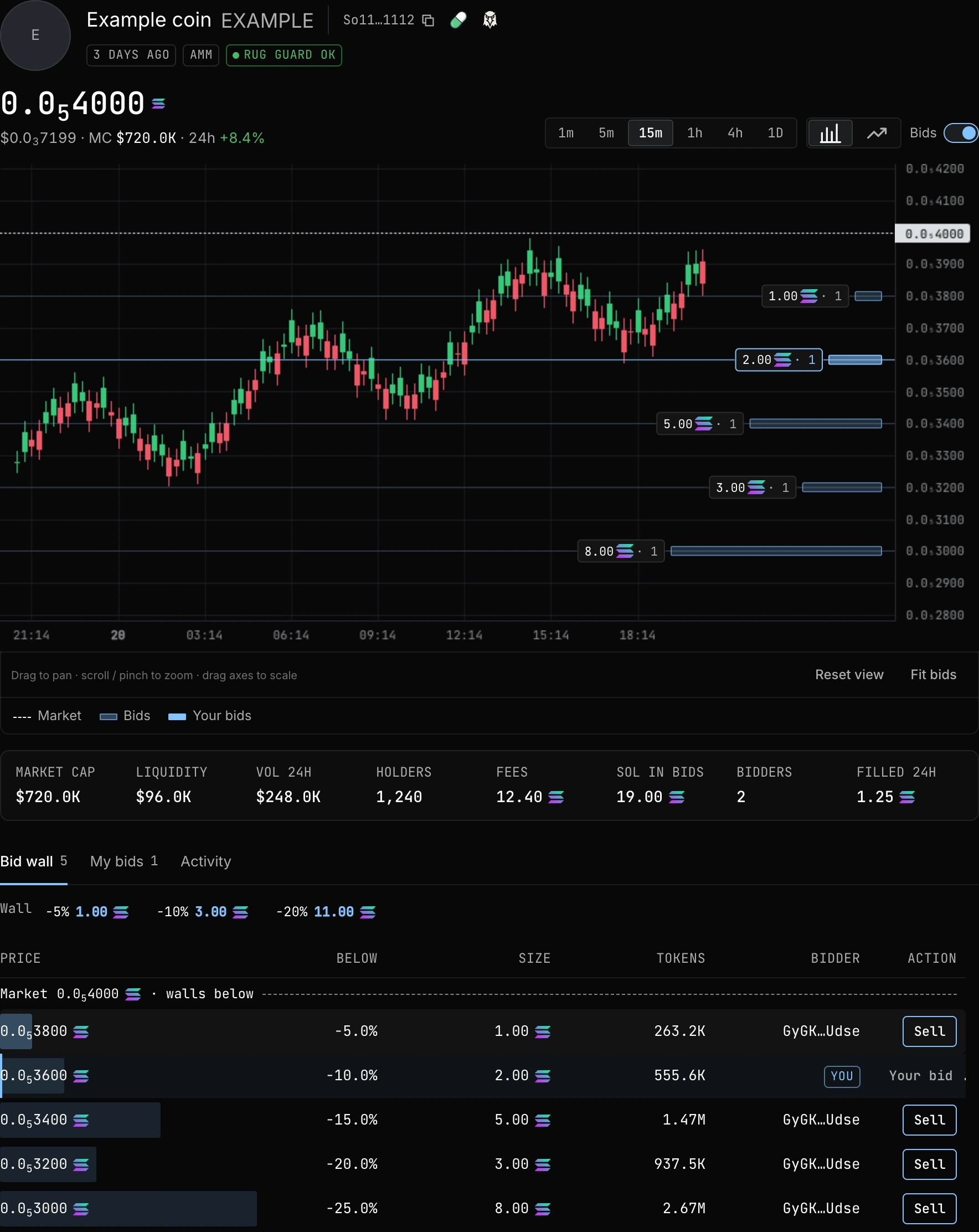
Drag the chart to move through time and price. Scroll or pinch to zoom; drag the bottom or right axis to stretch its scale. Reset view returns to the recent market. Fit bids includes every open level, including bids outside your current view.
Small or overlapping levels can appear as lines without a label. The crosshair shows price and time without a popup. Click a line or its marker to sell into a bid. If several buyers share the level, choose one before entering your amount. Your chosen view stays in place as prices refresh.
#Walls at −5%, −10% and −20%
Catalogue wall totals are cumulative. The −10% total includes the bids already counted within −5%. The −20% total includes both narrower bands. Do not add the three values together to estimate total escrow.
| Wall | Included bids |
|---|---|
| Within 5% | Bids at the market or no more than 5% below it. |
| Within 10% | All bids at the market or no more than 10% below it, including the 5% wall. |
| Within 20% | All bids at the market or no more than 20% below it, including the narrower walls. |
#Your levels
Connect your wallet to distinguish your own bids. Click a foreign bid in the list or chart to open its sell form. Clicking your own bid opens My bids. A click only selects an order; it never submits a transaction.
A direct fill exchanges tokens against the bid account rather than swapping through the market pool. It does not by itself move that pool's price. Market prices and point tiers can still change independently.
TradingView Lightweight Charts™. Copyright (c) 2025 TradingView, Inc. License and notice.